Sales can calculate a proposed project’s margin without seeing anyone’s salary. Finance provides a standard hourly planning cost for each role, such as analyst or consultant. Sales multiplies those rates by the planned hours and adds the other project costs. Individual employee costs are stored separately and require additional access permission.
In plain words
Salaries are private, but sales still needs to know whether a deal makes money. The answer is a planning rate: a standard hourly cost for a role, set by finance, that is not any one person’s pay. Sales prices from planning rates and sees the margin; only a few people see actual pay.
Who this helps: Sales managers, finance staff, HR partners and administrators who set permissions.
Questions this guide answers:
- How do you share project margin without showing salaries?
- What is a planning rate?
- Who should see staff costs in a project tool?
What is a planning rate, and how is it different from pay?
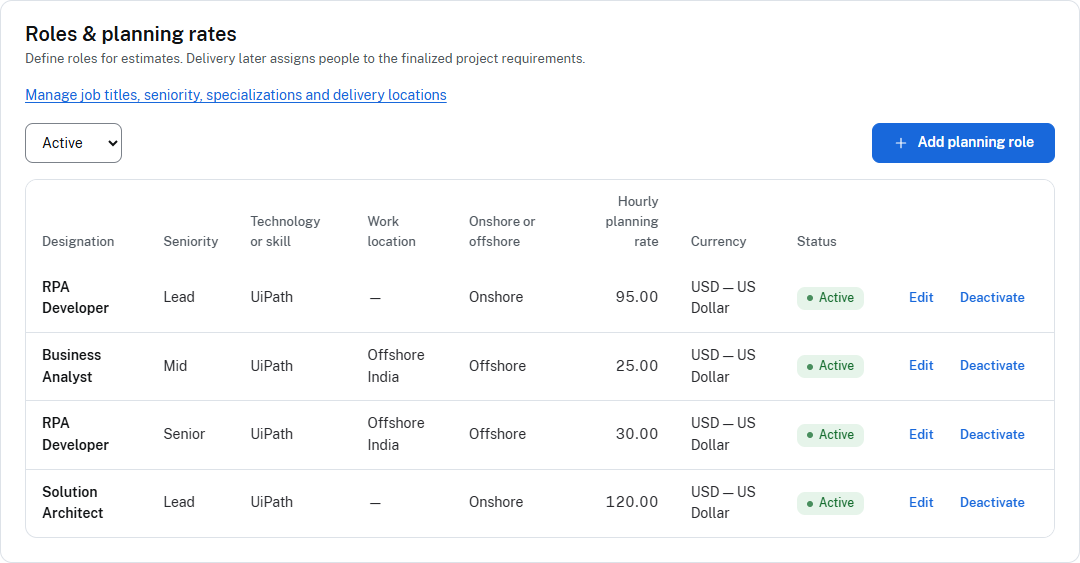
A planning rate is an internal estimate of what one hour of a particular role will cost the business. For example, finance might approve USD 80 per hour for an analyst role. That rate can include selected employment costs, depending on the firm’s policy. It is neither the hourly price charged to the client nor a statement that a particular analyst earns USD 80 per hour.
An individual employee-cost record belongs to a named person and has an effective date. Delivery calculations can use that record once the person is assigned to the work. The difference matters: a proposal can be prepared before the team knows which employee will perform each task.
| Number | Meaning | Example use |
|---|---|---|
| Role planning cost | Approved internal cost assumption for a role | Estimate 300 analyst hours before naming an employee |
| Individual employee cost | Protected cost record for a named person | Calculate delivery cost using the applicable effective rate |
| Client billing rate or fee | The amount charged to the client | Test whether the offered price covers the included costs and margin |
For more detail, see cost rates versus billing rates and what a loaded cost rate includes.
Example: how can sales approve a price without seeing a salary?
Suppose a consulting firm proposes 300 analyst hours for a fixed client fee of USD 40,000. Finance supplies a planning cost of USD 80 per hour. For this illustration, commission is 5% of the fee and overhead is 10% of the fee. The planning rate excludes those two costs, so they are added only once. Tax and other costs are excluded from this teaching example.
- Calculate labor: 300 hours × USD 80 per hour = USD 24,000.
- Calculate commission: USD 40,000 × 5% = USD 2,000.
- Calculate overhead: USD 40,000 × 10% = USD 4,000.
- Add the included costs: USD 24,000 + USD 2,000 + USD 4,000 = USD 30,000.
- Calculate the margin amount: USD 40,000 fee − USD 30,000 costs = USD 10,000.
- Convert it to a percentage: USD 10,000 / USD 40,000 × 100 = 25%.
Sales can now explain that the proposed fee leaves 25% after the costs included in this model. No employee’s salary was needed. This is a planned project margin, not company net profit or evidence of the final delivery result.
If the client asks for a USD 36,000 fee, labor remains USD 24,000 but commission and overhead fall to USD 1,800 and USD 3,600. The remaining margin is USD 6,600, or 18.33%. Sales should compare that result with the firm’s approval policy before accepting the discount. See how discounts affect margin.
How do you reproduce the example in Managed Margin?
- Finance maintains an approved analyst resource profile with an USD 80 hourly planning rate. Record what that rate includes; see the rate-card guide.
- Create a pricing strategy for the fixed-price service order. A service order is the commercial piece of work being priced within the project.
- Plan the role’s 300 hours in the stage or weekly resource plan. Enter the USD 40,000 fee and apply the two revenue-based cost rules from the example.
- Calculate the strategy and check that the included costs and 25% margin reconcile. A different cost-rule configuration will produce a different result.
- Compare any alternative price in a separate strategy. Finalize the approved option so the agreed price, hours and planning rates remain the baseline.
Delivery then assigns named people to the planned roles and records the work performed. Actual and forecast delivery costs can differ from the proposal because hours, people or applicable rates differ. Keep the original baseline for comparison. The pricing workflow and handover guide explain these steps.
Who can see planning figures and employee costs?
Managed Margin distinguishes planning financial information, project financial information and individual employee costs. A user needs the appropriate permissions for the information they open. Protected employee-cost access also requires the product’s HR Sensitive clearance—a separate access category for sensitive personnel information.
Sales normally needs the role plan and proposed margin. A delivery manager needs the work plan and the financial views authorized for that project. HR or finance may need employee-cost records to maintain them. These are typical responsibilities, not an absolute rule based on job title: workspace roles can be configured, and one person may hold several roles.
Grant access according to the task and review the effective permissions. Do not assume that changing a role’s name changes what it permits. The product workflow’s role-access section provides an overview.
Real example: a sales manager approves a price without seeing salaries
An illustrative story with invented figures, to show how the idea works in a real office.
Zoe, a sales manager, needs to approve a USD 100,000 price. Finance has set planning rates by role: USD 90 for a lead, USD 55 for a consultant. Zoe sees the role plan (80 lead hours at USD 90, 1,000 consultant hours at USD 55 and 120 tester hours at USD 45, a cost of USD 67,600) and the margin it produces, about 32.4% (rounded to 32%; other costs are excluded in this example), but not what any named person earns.
She asks for a cheaper price. Finance shows her the margin at a lower price of USD 91,400: 26.04% (about 26%), below the firm’s 30% floor. Zoe asks for a smaller reduction.
At no point did she need to see a salary. If she did, it would be an exception handled by finance, not a standing permission.
When should you set up planning rates and project permissions?
| Step | Owner | Checkpoint |
|---|---|---|
| Define planning rates | Finance | Each role has an approved hourly planning rate, with what it includes |
| Set permissions | System administrator with finance | Individual employee cost is a separate, protected permission |
| Price | Sales or presales | Margin is calculated from planning rates; no salary is visible |
| Review access | Finance, regularly | Who can see planning figures and who can see employee cost is checked and recorded |
What should you check before sharing a project margin view?
- Confirm the recipient’s effective project and workspace permissions, including any additional roles.
- Test an account with those permissions: check the pricing screen, delivery financials and individual employee-cost records.
- Check exports and manually prepared documents separately. Sharing a spreadsheet outside the application creates another access boundary.
- Use illustrative employee data for demonstrations, and review whether small-team totals reveal information indirectly.
A failed check needs a permission or sharing-process correction before that view is distributed. This article explains the workflow; it is not a certification that every workspace configuration prevents every possible inference.
What are the alternatives to sharing margin without pay rates?
A controlled spreadsheet can use the same role-rate method for a small number of proposals, provided access, versions and exports are managed. A system with separate planning and employee-cost permissions becomes useful when several teams need a shared baseline and delivery updates. Hiding all cost information from sales is another option, but then finance must provide the pricing calculation and explain the available negotiation room.
Choose based on who needs to make the decision, how often the figures change and whether you can keep personal information separated in the actual workflow. Moving the calculation into software does not remove the need to review permissions.
Frequently asked questions
Does a planning rate reveal someone’s salary?
Not necessarily. It is a role-level cost assumption and may include costs beyond pay. However, a very narrow role group or detailed totals can still allow someone to infer information. Review the audience and level of detail.
Will planned and actual margin always match?
No. The assigned people’s applicable costs, actual hours and other project costs can differ from the pricing assumptions. Compare the original plan with a clearly labeled actual-to-date or completion forecast.
Can sales see actual employee cost if they have another role?
A person with the required employee-cost permission and HR Sensitive clearance may have that access. The job title “sales” alone is not an access restriction.
Is the planning rate the rate shown to the client?
No. The planning rate is an internal cost input. A client billing rate or fixed fee is the commercial price; it must be assessed against the included costs and the required margin.
- Replace a Project Margin Spreadsheet: When and How
- Contribution Margin vs Net Margin vs Gross Margin
- What Is Managed Margin? Meaning, Formula and Software
- Project Margin Management Software: How to Evaluate It
Continue with the next pricing decision
Use target-margin pricing to work back from cost to a fee, or planned versus actual margin to understand delivery differences.
Sharing margin without salaries: frequently asked questions
How do I set a planning rate?
From the loaded cost of the role, skill and location, reviewed on a schedule. See the fully loaded cost rate guide.
Who should see actual pay?
Only the people who need it for delivery costing and finance, under their own permission.
What should a financial-visibility review test?
That each role sees what it should and nothing more, for both rates and margin.
How can sales see project margin without seeing salaries?
Finance approves a planning rate per role (for example USD 80 an hour for an analyst). Sales multiplies planning rates by planned hours, adds the other costs and compares the total with the fee. Individual pay is a separate, restricted record that the margin view does not need.
Continue the sequence: guides to read next
- Cost Rate vs Billing Rate: Costing and Rates Explained: the two rate types
- What Is a Project Rate Card? How to Build One: the planning rates sales prices from
Sources and methodology
This guide states no outside facts that need a citation: the formulas, stages and worked figures are Managed Margin’s own, built with the application.
The calculations are original illustrative examples, not employee data or customer results. Product statements were checked against the workspace role configuration, protected employee-cost permissions and pricing/delivery workflow on 13 October 2026. Actual visibility depends on the configured permissions. The linked product guides explain the workflow; they do not replace testing a workspace’s access settings.